Cut your per-file processing time in half.
Conditions, document collection, and status updates running on autopilot — so you can focus on closing loans, not chasing paperwork.
Your processors are spending half their day on tasks that should be automatic.
Every loan file touches dozens of hands and hundreds of data points. Conditions get missed. Documents get lost. Status updates fall behind. Borrowers call asking for updates your team doesn't have time to give. Agents get frustrated. Deadlines slip. And your best processors — the ones who should be focused on complex exceptions and quality control — are buried in routine tasks that a system should be handling.
How ProcessorFlow Works
From file opening to clear-to-close — every routine task automated.
File opens
When a new loan file enters your LOS, ProcessorFlow picks it up automatically. Conditions are identified and tracked from day one.
Conditions monitored
Outstanding conditions are tracked in real time. Follow-up requests go out automatically when deadlines approach or documents are missing.
Status updates sent
Borrowers, agents, and team members receive automatic status notifications. No more "where are we on this file?" calls.
Processors focus
Your team focuses on exceptions, quality control, and closing — not chasing paperwork. The system handles the routine; your people handle the complex.
See how it works
A processor’s day is death by a thousand cuts: documents arriving in every format from every direction, conditional approval letters no two lenders format alike, data retyped between the inbox and the LOS, deadlines living in someone’s head. Every cut is time — and at per-file economics, time is capacity. ProcessorFlow is condition clearing and document intake, inside your LOS: the AI does the reading, filing, and drafting; your processors stay in command of every decision.
The sixty-second walkthrough below shows one loan file moving through that layer. A conditional approval arrives and the full condition checklist comes out of it, item by item, whatever format the lender used. Structured data lands in your LOS’s fields. A condition is tracked from the document that satisfies it — so nothing gets re-requested that’s already on file. And the beat that matters most: an ambiguous condition — a mismatched figure, a missing page — stops in a Review queue with the reasoning attached and waits for your processor. The system refuses to decide; your people do.
Then status rides out of the same pass — borrower and broker updated, turn times ticking — and the board shows the file one step closer to clear-to-close.
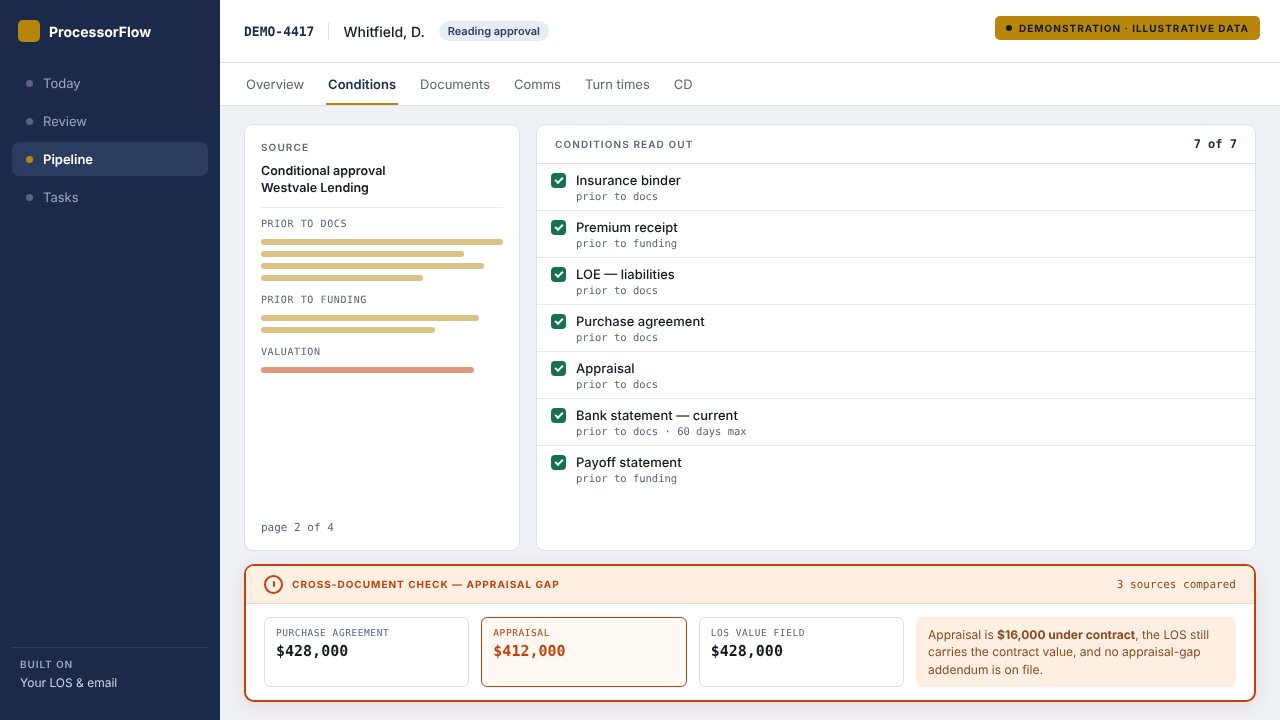
A demonstration built on illustrative data. No client files, no real people, no results claimed.
Files that move themselves — while your people decide.
Read the transcript
Arrival: A conditional approval lands — and matches itself to the right file. No file number in the email. Nobody clicks anything.
Read: Seven conditions come off the letter — whatever format the lender used. The appraised value is checked against the contract and the LOS. They disagree.
File: Two conditions clear themselves from the file — and a stale copy is caught, not waved through. Read, renamed, filed, tracked — on the email and the LOS you already run.
Flag: An appraisal gap. An ambiguous condition. Both stop — with the reasoning shown. ProcessorFlow has not chosen. Your processor decides.
Status: Four parties updated out of one pass. The borrower is asked for two things — not seven. The email lands as a draft, in your voice. You review. You send.
Board: The board computes the earliest close the file’s own gates allow — and flags the date that won’t hold, today.
Nothing decides alone.
ProcessorFlow never sends an email, never submits to a lender, never makes a judgment call on its own. It reads, organizes, flags, and drafts; the human reviews and decides. Emails arrive as drafts in the processor’s own inbox — they read, adjust, and hit send. The design principle the whole product stands on: incorrect automation is worse than no automation. Anything the AI isn’t certain about goes to a human, every time.
This is not an OCR dump and not a robot closer. Extraction lands in your LOS with exceptions flagged to your own processors — their human-in-the-loop, our pipeline. Compliance-critical judgment stays with your people; the system’s job is that they never retype what a machine can read and never miss what a machine can flag.
The AI reads and drafts. You decide.
Weighing outsourcing against automation? We wrote the decision up in full: Outsource mortgage processing vs. automate — the honest comparison →
Bring a live file and your pipeline as it actually runs. We’ll look at where the hours are going and whether they have to — no pitch-deck theater.
Prefer to start smaller? The Intake Read is free and under NDA — ask for it on the call.
What ProcessorFlow Automates
Automated Condition Tracking
Monitors every outstanding condition on every file. Triggers follow-ups when documents are missing or deadlines approach. Nothing gets missed.
Document Management
Document collection, organization, and routing on autopilot. Files go where they need to go without manual sorting or forwarding.
Status Notifications
Borrowers, agents, and team members stay informed automatically. Milestone updates, document received confirmations, and deadline reminders — no manual outreach.
No Rip-and-Replace. No LOS Cooperation Required.
ProcessorFlow doesn’t ask you to switch systems — it’s built on the email and Google Drive already flowing through your day. Documents you pull from Encompass or your LOS get the same treatment the moment they land: read, renamed, filed, tracked. Deployed within 2–4 weeks. If your system has an API, an export, or a portal, we can build on it — we start by learning what you actually run.
Compliance Guardrails
Built-in checks catch issues before they become problems. Regulatory timelines monitored, disclosure requirements flagged, audit trails maintained.
Pipeline Dashboard
See every file in your pipeline, its status, outstanding conditions, and next actions at a glance. Real-time visibility across your entire operation.
Frequently Asked Questions
Ready to give your processors their time back?
Book a free 30-minute strategy call. We'll map your current workflow and show you exactly what can be automated.